What Should AI Order Entry Actually Do for a Distributor?
Most AI order entry only converts the document. Here are the 10 steps an inside rep does on every order, and how to test which ones a vendor automates.


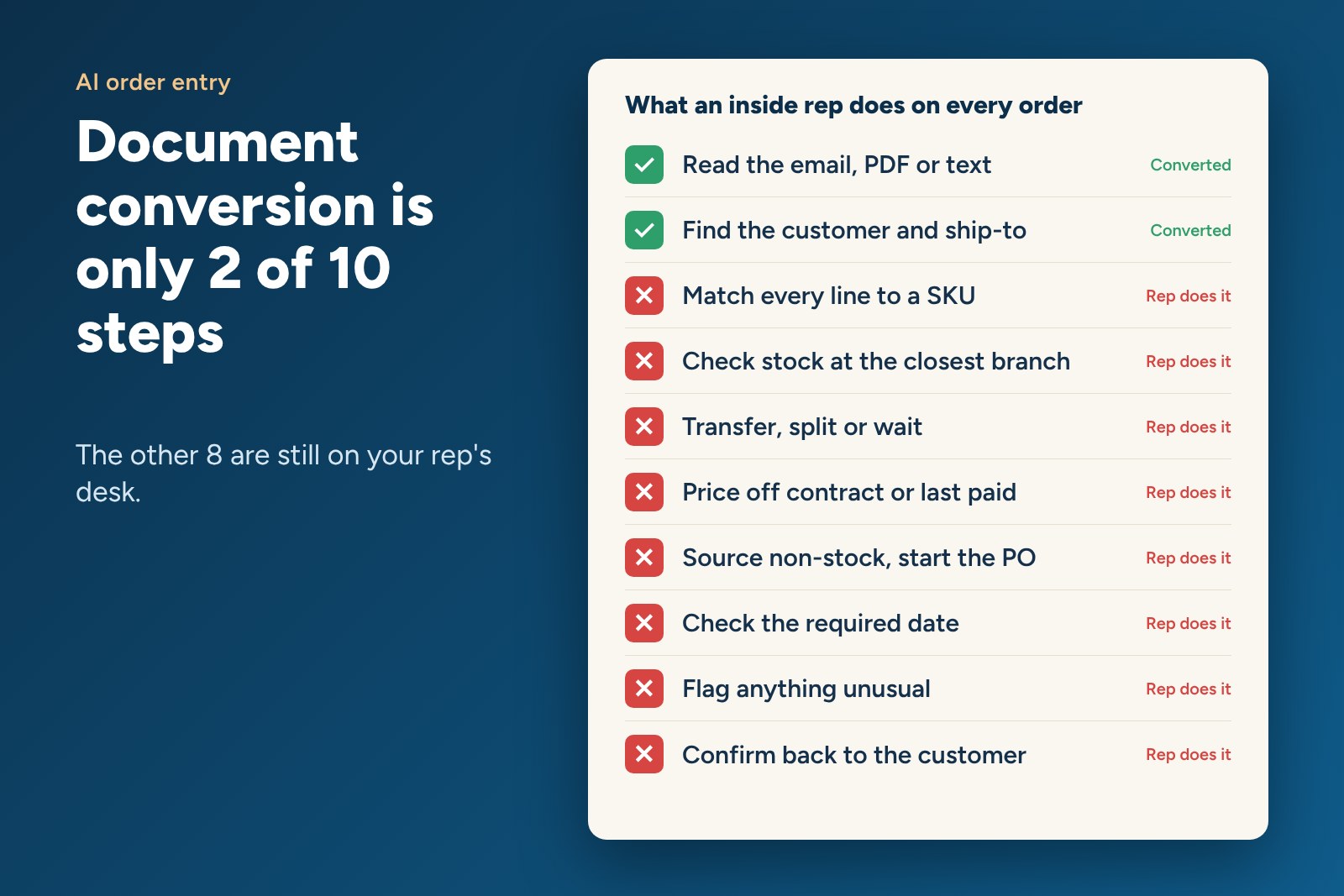
Table of contents
OptionShort answer: AI order entry should do the whole job an inside rep does on an order, not just read the document. That means matching every line to the right SKU, checking stock across branches, choosing the most cost-effective way to ship, pricing each line, sourcing non-stock items and flagging only the lines that need a person.
Document conversion, meaning turning an email or PDF into data your ERP can read, is useful. But it is less than 15% of what your sales team actually does to get an order out the door. If a tool stops there, your reps still do the other 85%.
What does an inside rep actually do to enter one order?
Watch a good rep work a real order and you will see roughly ten steps.
- Read the email, PDF, text or voicemail.
- Find the customer account and the right ship-to.
- Match every line to a SKU, even when the customer used their own part number, a competitor's number or only a description.
- Check stock at the closest branch.
- Decide whether to transfer from another branch, ship from two warehouses or wait.
- Price each line off the customer's contract, special pricing agreement or last paid price.
- Source items you don't stock from a supplier, then start the PO.
- Check the required delivery date against what is possible.
- Flag anything unusual, like a quantity ten times the customer's normal.
- Confirm the order back to the customer.
Which of those steps does document conversion cover?
Steps 1 and 2. Sometimes a rough version of step 3 when the part numbers are clean.
That is why many distributors feel let down after buying "AI order entry." The order shows up in the ERP faster, but the rep still has to verify every line, check every branch, fix the pricing and chase the specials. The work moved. It didn't go away.
- Read any format: document conversion yes, order building yes.
- Find customer and ship-to: conversion usually, order building yes.
- Match lines without exact part numbers: conversion limited, order building yes, scored for confidence.
- Check stock across branches: conversion no, order building yes.
- Transfers and splits: conversion no, order building yes, only when more cost-effective.
- Contract and last paid pricing: conversion no, order building yes.
- Non-stock sourcing and PO: conversion no, order building yes.
- Required delivery date check: conversion no, order building yes.
- Flag unusual lines: conversion rarely, order building yes, line by line.
- Customer confirmation: conversion no, order building yes.
Why is matching the line the hardest step?
Because customers don't speak in your part numbers. They say "the blue one," "same as last time," "three-quarter set screw connector, die-cast" or they send a competitor's number from a box label.
A good rep resolves these from memory and the customer's history. Software can do the same if it is trained on your catalog and twelve months or more of each customer's buying history. Then it can score each match. A certain match flows through. A close match gets a quick look. An unknown gets a person.
How do product recommendations fit in?
Once the system knows the customer's history and your catalog, it can also suggest what the rep would have suggested. The substitute when an item is out. The accessory the customer always forgets. The newer version of a discontinued part. That is how a new rep starts selling like a veteran, because the veteran's knowledge shows up on the screen during the call.
How do I test a vendor on the other 85%?
Bring ten of your messiest real orders to the demo. Include an email body with no attachment, a handwritten list, a PDF with the customer's own part numbers and one order with an item you don't stock. Then ask the vendor to show you, live:
- How each line was matched and how confident the system is.
- Which branch each line ships from and why.
- How each line was priced.
- What happened to the non-stock item.
- Exactly which lines a rep would need to touch.
If the demo ends when the data lands in the ERP, you are looking at document conversion.
Does this replace inside sales reps?
No. It changes what they spend their day on. Reps stop keying and checking, and spend that time on customers, quotes and the judgment calls software shouldn't make. The point is to grow without hiring at the same pace.
Frequently asked questions
What is the difference between AI order entry and sales order automation?
The terms are often used the same way. The real difference is scope. Some tools only convert the document. Full sales order automation builds, prices and fulfills the order behind it.
Can AI order entry handle phone orders?
Some systems can listen to a call and build the order on the rep's screen while the customer is still talking. Ask vendors to demo a live call, not a recording.
What is a confidence score in order automation?
It is the system's own rating of how sure it is about each line. You set the threshold for what flows through automatically and what goes to a rep.
Does AI order entry work with older ERPs?
Many tools only connect to modern APIs. Ask specifically about your ERP version, and ask for a reference customer on the same system.
How do I measure success after launch?
Track the share of orders that flow straight through, minutes per order for the ones that don't, error rate and quote turnaround time. Compare each to your pre-launch baseline.
Mike Mayer is CMO of Revalgo and has spent 23 years running digital and order-desk strategy for manufacturers and distributors.
Related reading: Why Do Order Automation Projects Fail at Distributors?